
Employee Projects
ACalmstageforworkworthnoticing.
Internal launches, experiments, and the craft behind them.
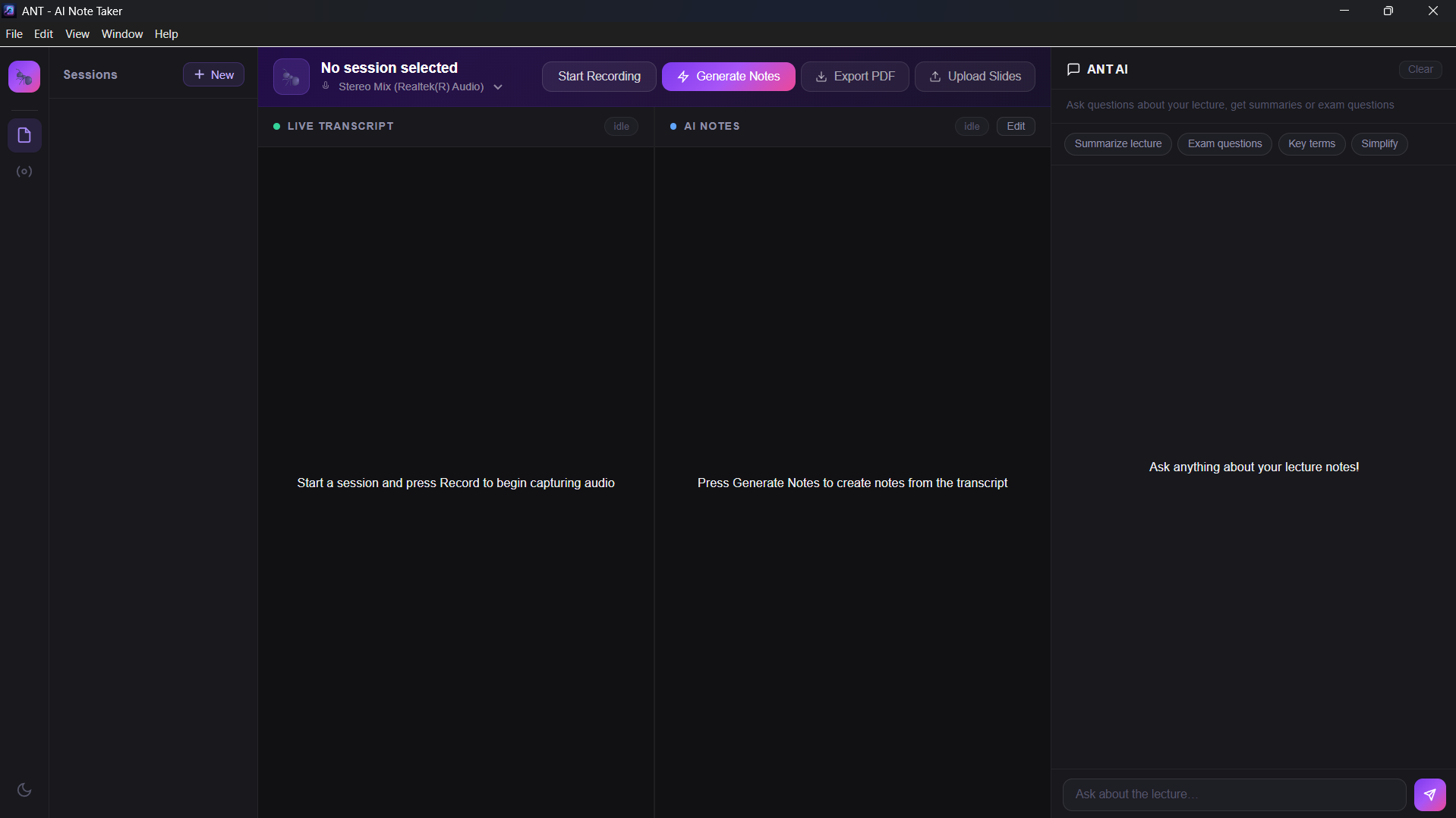
AI Note Taker (ANT)
A free, offline-first AI powered desktop application that automatically generates structured notes from live lectures, online classes, and meetings. 🎙️ Live audio capture — captures system audio from Zoom, Teams, YouTube and any online lecture 📝 AI transcription — uses OpenAI Whisper to convert speech to text in real time 🤖 Smart note generation — Groq AI organizes transcript into clean structured notes 💬 Chat with AI — ask questions about your lecture, get exam questions, summaries 📄 Slide support — upload PDF or image slides for better context 📤 Export as PDF — download your notes as a formatted PDF 🗄️ Session history — all sessions saved permanently, never lose your notes 🌙 Dark / light theme — easy on the eyes during long lectures 🛠️ Tech Stack Layer Technology Desktop app Electron UI HTML, CSS, JavaScript Backend Python, FastAPI Speech to text faster-whisper (OpenAI Whisper) AI notes Groq API (Llama 3.3 70B) Slide processing PyMuPDF Database SQLite Packaging PyInstaller, electron-builder 🚀 Getting Started Prerequisites Windows 10/11 A free Groq API key Stereo Mix enabled in Windows sound settings Installation Download ANT - AI Note Taker Setup 1.0.0.exe from Releases Run the installer (click "More info" → "Run anyway" if Windows warns you) Launch ANT from desktop shortcut Enter your Groq API key in settings Enable Stereo Mix in Windows sound settings Enable Stereo Mix Right click speaker icon in taskbar Sound settings → More sound settings Recording tab → Right click Stereo Mix → Enable 📖 How to Use Create a session — click "+ New" and give it a name Select Stereo Mix from the device dropdown Play your lecture — YouTube, Zoom, Teams, any online class Press Record — ANT starts listening and transcribing Press Generate Notes when done — AI creates structured notes Chat with AI — ask questions about the lecture Export PDF — save your notes 🔑 API Keys Required Service Cost Link Groq API Free console.groq.com
AI-Powered Task Management App
Description An intelligent productivity platform that helps teams organize projects, track progress, and automate repetitive tasks. AI-driven recommendations assist with prioritization, deadline management, and workflow optimization. The application improves collaboration while reducing administrative overhead. These are the kind of descriptions and visuals that look strong on a portfolio website, GitHub showcase page, or CV project section.
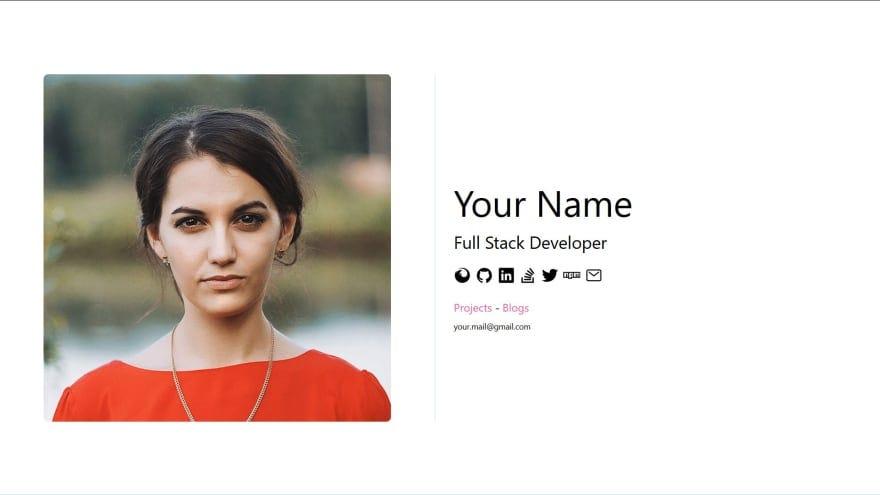
Smart Portfolio Website
Description A modern portfolio platform built for developers and designers to showcase projects, skills, and achievements. The website features smooth animations, responsive layouts, project filtering, and integrated contact forms. Designed with a clean aesthetic that emphasizes content and user experience.
AI Note Taker (ANT)
A free, offline-first AI powered desktop application that automatically generates structured notes from live lectures, online classes, and meetings. 🎙️ Live audio capture — captures system audio from Zoom, Teams, YouTube and any online lecture 📝 AI transcription — uses OpenAI Whisper to convert speech to text in real time 🤖 Smart note generation — Groq AI organizes transcript into clean structured notes 💬 Chat with AI — ask questions about your lecture, get exam questions, summaries 📄 Slide support — upload PDF or image slides for better context 📤 Export as PDF — download your notes as a formatted PDF 🗄️ Session history — all sessions saved permanently, never lose your notes 🌙 Dark / light theme — easy on the eyes during long lectures 🛠️ Tech Stack Layer Technology Desktop app Electron UI HTML, CSS, JavaScript Backend Python, FastAPI Speech to text faster-whisper (OpenAI Whisper) AI notes Groq API (Llama 3.3 70B) Slide processing PyMuPDF Database SQLite Packaging PyInstaller, electron-builder 🚀 Getting Started Prerequisites Windows 10/11 A free Groq API key Stereo Mix enabled in Windows sound settings Installation Download ANT - AI Note Taker Setup 1.0.0.exe from Releases Run the installer (click "More info" → "Run anyway" if Windows warns you) Launch ANT from desktop shortcut Enter your Groq API key in settings Enable Stereo Mix in Windows sound settings Enable Stereo Mix Right click speaker icon in taskbar Sound settings → More sound settings Recording tab → Right click Stereo Mix → Enable 📖 How to Use Create a session — click "+ New" and give it a name Select Stereo Mix from the device dropdown Play your lecture — YouTube, Zoom, Teams, any online class Press Record — ANT starts listening and transcribing Press Generate Notes when done — AI creates structured notes Chat with AI — ask questions about the lecture Export PDF — save your notes 🔑 API Keys Required Service Cost Link Groq API Free console.groq.com
AI-Powered Task Management App
Description An intelligent productivity platform that helps teams organize projects, track progress, and automate repetitive tasks. AI-driven recommendations assist with prioritization, deadline management, and workflow optimization. The application improves collaboration while reducing administrative overhead. These are the kind of descriptions and visuals that look strong on a portfolio website, GitHub showcase page, or CV project section.
Smart Portfolio Website
Description A modern portfolio platform built for developers and designers to showcase projects, skills, and achievements. The website features smooth animations, responsive layouts, project filtering, and integrated contact forms. Designed with a clean aesthetic that emphasizes content and user experience.
AI Note Taker (ANT)
A free, offline-first AI powered desktop application that automatically generates structured notes from live lectures, online classes, and meetings. 🎙️ Live audio capture — captures system audio from Zoom, Teams, YouTube and any online lecture 📝 AI transcription — uses OpenAI Whisper to convert speech to text in real time 🤖 Smart note generation — Groq AI organizes transcript into clean structured notes 💬 Chat with AI — ask questions about your lecture, get exam questions, summaries 📄 Slide support — upload PDF or image slides for better context 📤 Export as PDF — download your notes as a formatted PDF 🗄️ Session history — all sessions saved permanently, never lose your notes 🌙 Dark / light theme — easy on the eyes during long lectures 🛠️ Tech Stack Layer Technology Desktop app Electron UI HTML, CSS, JavaScript Backend Python, FastAPI Speech to text faster-whisper (OpenAI Whisper) AI notes Groq API (Llama 3.3 70B) Slide processing PyMuPDF Database SQLite Packaging PyInstaller, electron-builder 🚀 Getting Started Prerequisites Windows 10/11 A free Groq API key Stereo Mix enabled in Windows sound settings Installation Download ANT - AI Note Taker Setup 1.0.0.exe from Releases Run the installer (click "More info" → "Run anyway" if Windows warns you) Launch ANT from desktop shortcut Enter your Groq API key in settings Enable Stereo Mix in Windows sound settings Enable Stereo Mix Right click speaker icon in taskbar Sound settings → More sound settings Recording tab → Right click Stereo Mix → Enable 📖 How to Use Create a session — click "+ New" and give it a name Select Stereo Mix from the device dropdown Play your lecture — YouTube, Zoom, Teams, any online class Press Record — ANT starts listening and transcribing Press Generate Notes when done — AI creates structured notes Chat with AI — ask questions about the lecture Export PDF — save your notes 🔑 API Keys Required Service Cost Link Groq API Free console.groq.com
AI-Powered Task Management App
Description An intelligent productivity platform that helps teams organize projects, track progress, and automate repetitive tasks. AI-driven recommendations assist with prioritization, deadline management, and workflow optimization. The application improves collaboration while reducing administrative overhead. These are the kind of descriptions and visuals that look strong on a portfolio website, GitHub showcase page, or CV project section.
Smart Portfolio Website
Description A modern portfolio platform built for developers and designers to showcase projects, skills, and achievements. The website features smooth animations, responsive layouts, project filtering, and integrated contact forms. Designed with a clean aesthetic that emphasizes content and user experience.
AI Note Taker (ANT)
A free, offline-first AI powered desktop application that automatically generates structured notes from live lectures, online classes, and meetings. 🎙️ Live audio capture — captures system audio from Zoom, Teams, YouTube and any online lecture 📝 AI transcription — uses OpenAI Whisper to convert speech to text in real time 🤖 Smart note generation — Groq AI organizes transcript into clean structured notes 💬 Chat with AI — ask questions about your lecture, get exam questions, summaries 📄 Slide support — upload PDF or image slides for better context 📤 Export as PDF — download your notes as a formatted PDF 🗄️ Session history — all sessions saved permanently, never lose your notes 🌙 Dark / light theme — easy on the eyes during long lectures 🛠️ Tech Stack Layer Technology Desktop app Electron UI HTML, CSS, JavaScript Backend Python, FastAPI Speech to text faster-whisper (OpenAI Whisper) AI notes Groq API (Llama 3.3 70B) Slide processing PyMuPDF Database SQLite Packaging PyInstaller, electron-builder 🚀 Getting Started Prerequisites Windows 10/11 A free Groq API key Stereo Mix enabled in Windows sound settings Installation Download ANT - AI Note Taker Setup 1.0.0.exe from Releases Run the installer (click "More info" → "Run anyway" if Windows warns you) Launch ANT from desktop shortcut Enter your Groq API key in settings Enable Stereo Mix in Windows sound settings Enable Stereo Mix Right click speaker icon in taskbar Sound settings → More sound settings Recording tab → Right click Stereo Mix → Enable 📖 How to Use Create a session — click "+ New" and give it a name Select Stereo Mix from the device dropdown Play your lecture — YouTube, Zoom, Teams, any online class Press Record — ANT starts listening and transcribing Press Generate Notes when done — AI creates structured notes Chat with AI — ask questions about the lecture Export PDF — save your notes 🔑 API Keys Required Service Cost Link Groq API Free console.groq.com
AI-Powered Task Management App
Description An intelligent productivity platform that helps teams organize projects, track progress, and automate repetitive tasks. AI-driven recommendations assist with prioritization, deadline management, and workflow optimization. The application improves collaboration while reducing administrative overhead. These are the kind of descriptions and visuals that look strong on a portfolio website, GitHub showcase page, or CV project section.
Smart Portfolio Website
Description A modern portfolio platform built for developers and designers to showcase projects, skills, and achievements. The website features smooth animations, responsive layouts, project filtering, and integrated contact forms. Designed with a clean aesthetic that emphasizes content and user experience.
Meet our team
Meet the team that makes the magic happen!